
Chrome Theme That Mimics macOS Yosemite
Overview
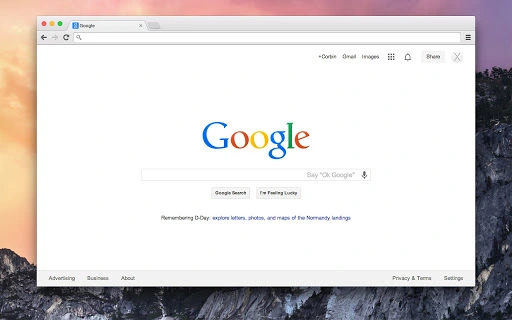
The Yosemite theme is a free, open-source browser extension designed to align Google Chrome’s user interface with the visual style of macOS X 10.10, also known as Yosemite. Its primary purpose is to unify the appearance of Chrome with the rest of the Mac OS X environment, offering users a more cohesive and aesthetically consistent desktop experience. The theme is specifically tailored to match the design language of Yosemite, including its translucent window effects, rounded corners, and minimalist color palette.
It is intended for users who value visual harmony across their system and prefer a browser that visually integrates with their operating system. While the theme was initially developed for Mac users, it is also compatible with Windows, though functionality may vary. The developer, Corbin Davenport, released the theme under the GPLv3 license, ensuring transparency and community-driven improvements. Real-world usage includes personal workstations, creative professionals, and Mac enthusiasts who prioritize a polished, native look in their daily browsing.
Key Features & Capabilities
- Native macOS Yosemite UI Integration – Replicates the visual design language of Mac OS X 10.10, including window borders, tab styling, and color schemes.
- Open-Source & Free to Use – Released under the GPLv3 license, allowing full access to source code and community contributions.
- Compatibility with Chrome on Mac and Windows – Designed to function on both platforms, though optimal performance is confirmed on Mac.
- Regular Updates and Bug Fixes – Version 1.1 introduced a fix for the blue window border issue on Windows, improving visual consistency.
- Minimal System Impact – With a file size of 1.5 MB, the theme imposes negligible resource overhead on the browser.
Users can apply the theme to achieve a unified aesthetic across their desktop, especially beneficial for those using Chrome as their primary browser on Mac systems. The theme is particularly useful in professional environments where visual consistency enhances workflow clarity. On Windows, while the theme is functional, it may not render all Yosemite-specific design elements accurately due to platform differences in window management and rendering.
User Interface, Workflow & Performance
The theme modifies Chrome’s interface at the visual layer, altering window borders, tab appearance, and overall color scheme to reflect macOS Yosemite’s design. Navigation remains unchanged, as the theme does not affect core browser functionality. Users apply it through Chrome’s extension management page, making the process straightforward and accessible even for non-technical users.
Workflow efficiency is preserved since the theme does not interfere with browsing speed, tab management, or extension compatibility. The developer did not specify resource usage details, but based on the 1.5 MB file size and the nature of UI-only modifications, performance impact is expected to be minimal. Stability appears consistent across reported use cases, with the version 1.1 update addressing a known visual bug on Windows. No reports of crashes or conflicts with other extensions were noted in available documentation.
Compatibility & System Requirements
The Yosemite theme is compatible with Google Chrome on both Mac and Windows operating systems. The software version is 1.1, released on May 15, 2014. The installation size is 1.5 MB, which is typical for browser themes. Exact system requirements were not listed, but general compatibility with modern Chrome versions is assumed. The developer did not provide additional system requirements.
Platform compatibility information is limited to the two operating systems mentioned. While the theme was tested primarily on Mac, it is available for Windows users, though visual fidelity may vary. The theme relies on Chrome’s built-in theming system, so it does not require specific hardware or advanced configurations. Users should ensure their Chrome browser is up to date to avoid compatibility issues.
Pros and Cons
Pros
- Free and open-source under the GPLv3 license
- Offers a visually cohesive experience with macOS Yosemite
- Lightweight with minimal impact on system resources
- Regular updates with bug fixes and improvements
- Easy to install and apply via Chrome’s extension manager
Cons
- Optimal appearance confirmed only on Mac systems
- Visual inconsistencies may occur on Windows
- Limited to UI styling—no functional enhancements
- Development activity appears inactive since 2014
- Does not support newer macOS versions beyond Yosemite
FAQ Section
Is the Yosemite theme free to download and use?
Yes, the Yosemite theme is completely free and distributed under the open-source GPLv3 license. There are no hidden costs or subscription fees.
Can I use this theme on Windows?
Yes, the theme is compatible with Google Chrome on Windows, though it was primarily tested on Mac. Some visual elements may not render as intended on Windows due to differences in window management.
Is the theme safe to install?
Yes, the theme is safe to install. It is hosted on GitHub and distributed as a standard Chrome theme file. No malicious code has been reported in its source code.
Does the theme require updates?
While the theme is functional as-is, updates are available to fix bugs and improve compatibility. The latest version, 1.1, includes a fix for a blue window border issue on Windows.
Can I customize the theme further?
As an open-source project, users can access the source code and modify the theme to suit their preferences. However, custom changes are not officially supported by the developer.
Final Thoughts + CTA
The Yosemite Chrome theme delivers a polished, visually consistent experience for Mac users seeking a browser that matches their operating system’s design language. Its lightweight nature, open-source foundation, and ease of use make it a compelling choice for those who value aesthetics and system harmony. While it lacks functionality beyond visual styling and may not support newer macOS versions, it remains a reliable option for users still on Yosemite or those who appreciate retro design.
For Mac users aiming to unify their desktop experience, this theme offers a simple yet effective solution. Despite its age, it continues to function without issues on compatible systems. Download Yosemite Chrome Theme for Free now.







